Illustration: Unc Taylor TV graphic. Illustrated artwork, not a photograph of any person or scene.
🚨 How to Remove a YouTube Copyright Strike Unc Guide
How to remove a YouTube copyright strike: claim vs strike, counter notification, Copyright School, 90 days and a proof checklist from Unc Taylor's own strike.
Fort Lauderdale | YouTube copyright strike guide. Unc Taylor here. This week Sharrell's World put a strike on my live Blueface reaction, so I went through the whole YouTube system step by step. Here's the plain version, with the official YouTube Help links, so you can decode the chaos on your own channel without panic.
First: is it a claim or a strike?
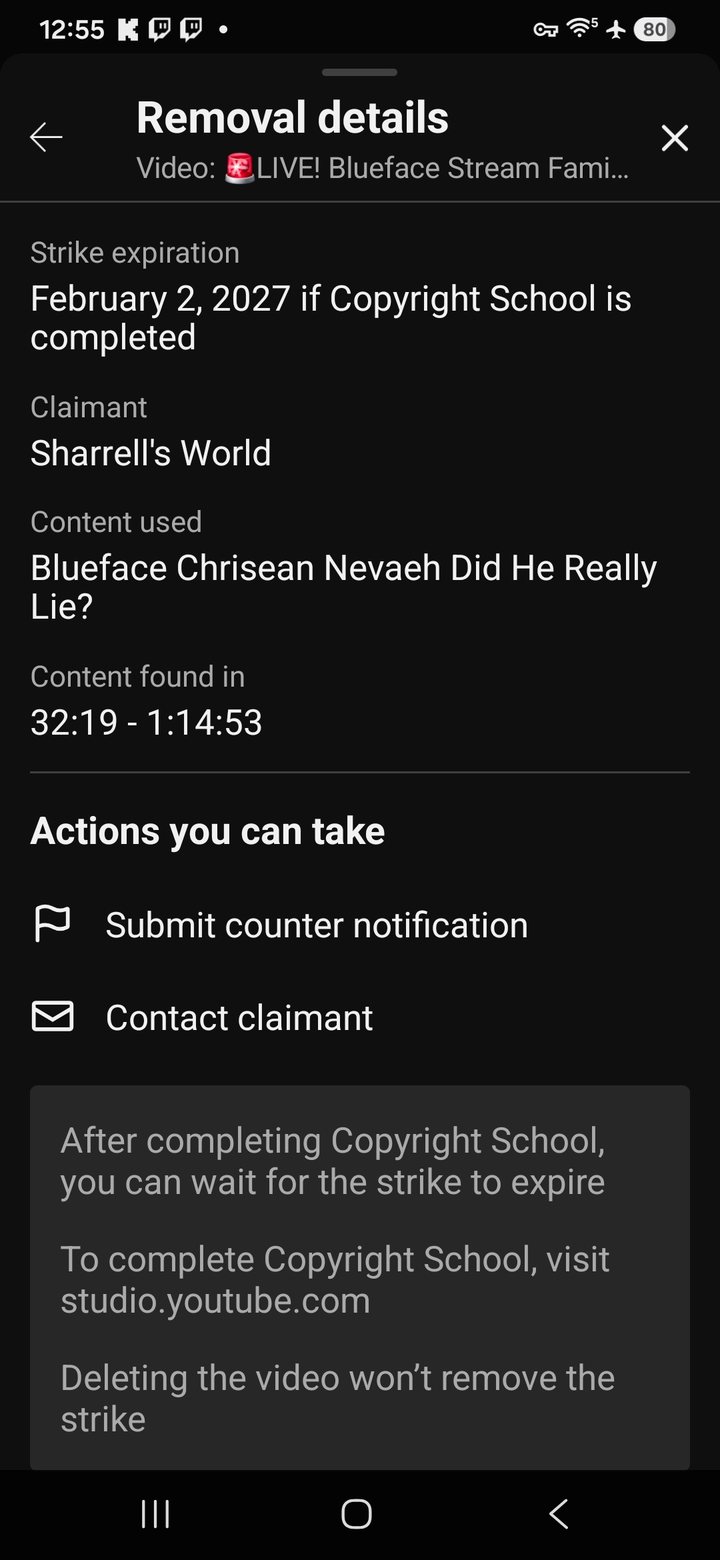
This is the part most creators mix up. A Content ID claim is automatic matching. It can take your money or block your video in some countries, but it does not put a strike on your channel. A copyright strike comes from a removal request filed by someone who says they own the content. The video comes down and the strike counts against you. Mine was a strike. The Removal details screen listed the claimant, the content used and the exact timestamps. Read more at YouTube Help: dispute a Content ID claim and YouTube Help: copyright strike basics.
The 90 day rule and 3 strikes
- Copyright School. Finish it and the strike expires 90 days after it was applied. My notice said February 2, 2027.
- Three strikes in 90 days. The channel can be terminated, all videos removed, and you can't make new channels.
- Live stream strikes. A strike on a live stream restricts live streaming for 7 days.
- Deleting doesn't help. YouTube says deleting the video won't remove the strike. Keep it so you can counter.
Step 1: ask for a retraction first
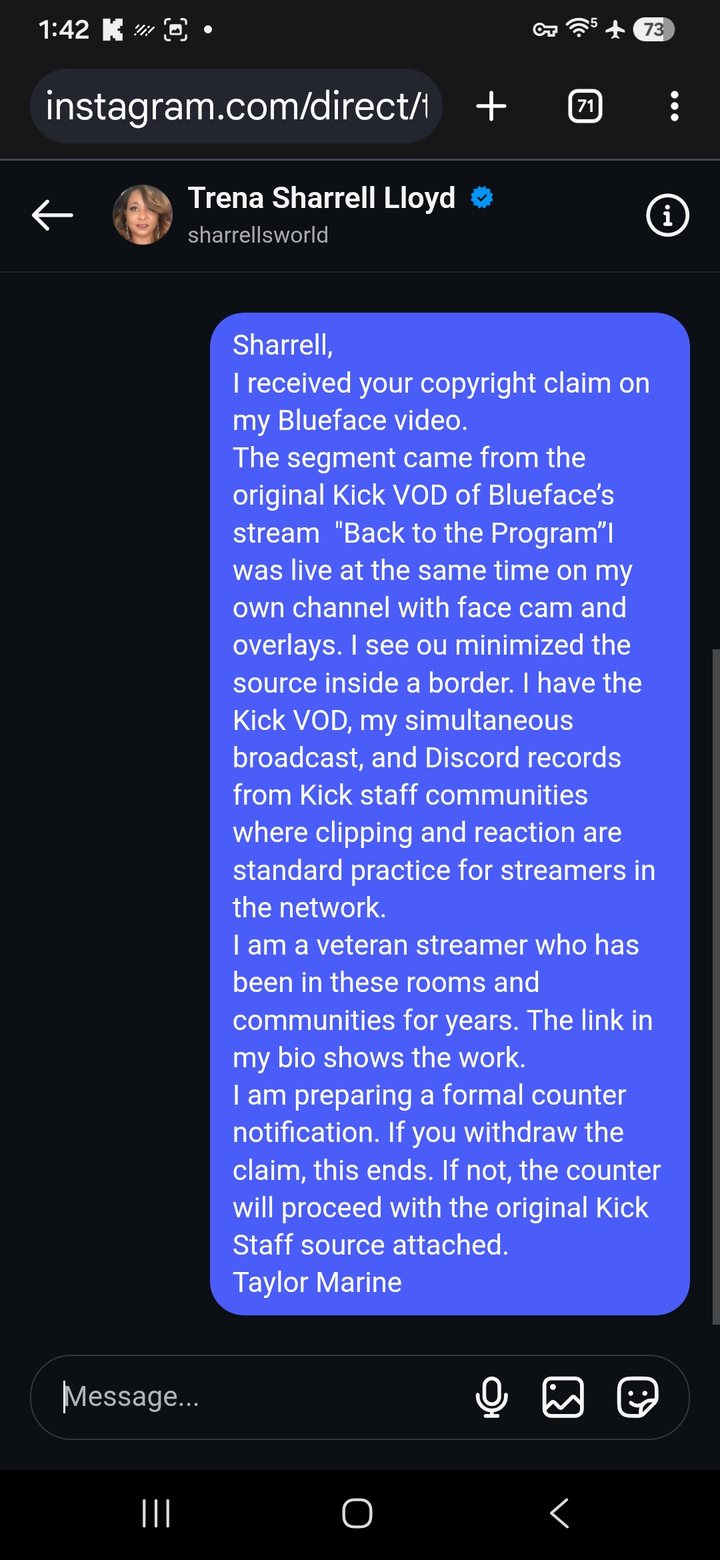
This is the cleanest fix. The person who filed can withdraw it, and the strike goes away. I sent a short, professional message to the claimant laying out where my footage came from and asking her to withdraw. Keep it calm. No insults. Screenshot it, because that message is part of your record too. Unc Logic: choose peace first, then use the process.
Step 2: build your proof checklist
- Original source link, such as the Kick or Twitch VOD you reacted to.
- Your raw recording or platform VOD with date and time.
- Screenshots of the strike: claimant, content used, timestamps, expiration.
- Proof of your own work: face cam, overlays, commentary, edits.
- Any permission, license or community clipping rules that cover your use.
- Your retraction request and any reply.
Step 3: submit a counter notification
If no retraction comes and you believe the video was removed by mistake or misidentification, you can file a counter notification from YouTube Studio. YouTube walks you through it at YouTube Help: submit a counter notification. Know this going in:
- It's a legal process. You'll give your legal name and address, and YouTube shares it with the claimant.
- The claimant gets 10 business days to show they filed legal action to keep the video down.
- If they don't, YouTube can reinstate the video and the strike can be resolved.
- Don't file one just to be petty. Only counter if you honestly believe it was a mistake.
Want the whole picture of how YouTube treats copyright? Read Copyright on YouTube, removal requests and How YouTube Works: copyright.
Step 4: protect the channel while you wait
Do Copyright School anyway, so the clock is running in your favor. Don't upload anything risky while a strike is active. Stream on your other platforms if your live access is restricted. I keep Kick and Twitch going so the community never misses a night.
This is general information from a creator who has been through it, not legal advice. Talk to a licensed attorney about your situation.
The full story behind my strike is in Sharrell's World strike explained, Unc Logic decoded, the news version is here, and if you clip Kick content read the Kick clipper survival directory.
FAQ: removing a YouTube copyright strike
Q: How do I remove a YouTube copyright strike?
A: There are three ways: wait 90 days after completing Copyright School, get the claimant to retract, or submit a counter notification if you believe the video was removed by mistake or misidentification.
Q: What is the difference between a Content ID claim and a copyright strike?
A: A Content ID claim usually affects monetization or blocks a video but does not add a strike. A copyright strike comes from a removal request, takes the video down and counts against your channel.
Q: Does deleting the video remove the copyright strike?
A: No. YouTube says deleting the video won't remove the strike. You still have to wait it out, get a retraction or counter.
Q: What happens after I file a counter notification?
A: YouTube shares it with the claimant, including your contact details. The claimant has 10 business days to show they filed legal action. If they don't, the video can be reinstated.
Q: How many copyright strikes before YouTube deletes a channel?
A: Three active copyright strikes within 90 days can lead to channel termination, removal of all videos and a block on making new channels.
Q: Can I still go live with a copyright strike?
A: A copyright strike on a live stream restricts live streaming for 7 days, according to YouTube Help. Check your channel's restrictions in YouTube Studio.
Discord: https://discord.com/invite/8fjWmzMV3a | Taylor Marine: taylormarinetechs.com | What is Unc Logic